After the company logos the game starts with the character alone on the ground. When she stands up the movement controls are revealed
Demo version from mobygames.com
The in-game configuration options. Note the game can be played in windowed or full screen modes and at a variety of screen resolutions
Demo version from mobygames.com
The game is keyboard controlled and the action keys can be redefined
Demo version from mobygames.com
The very start of the game and we're about to discover the game's map. The SPACEBAR is used to interact.
Demo version from mobygames.com
This is the screen where Carto assembles and reassembles map pieces, this is also keyboard controlled
Demo version from mobygames.com
To talk to a character Cart walks up to them and if a speech bubble appears then pressing SPACEBAR will step through the conversation
Demo version from mobygames.com
All map pieces must be connected. Carto cannot cross at corners
Demo version from mobygames.com
Conversations give information. This chap is lost. He knows is that his home is in the east so Carto must extend the island eastwards so that a house will appear
Demo version from mobygames.com
It is possible to enter buildings, just not all of them
Demo version from mobygames.com
This is Shianan. The tradition of her people is to set sail when they get to be fifteen and never return to the island. She's just invited Carto to join her
Demo version from mobygames.com
There is an inventory, press 'W' to view, and mini quests. Here Shianan has asked Carto to collect some soil to take on their voyage
Demo version from mobygames.com
So Shianan and Carto are ready to set off, Shianan asks Carto if she's ready and once that choice is made the family say their goodbyes
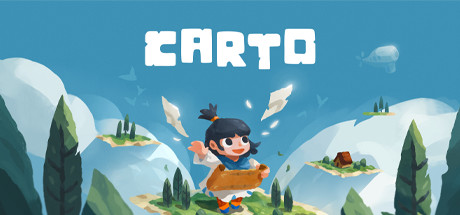
Carto is a charming adventure game wrapped around a unique, world-altering puzzle mechanic. Use this power to explore mysterious lands, help a quirky cast of characters, and guide Carto on her journey back to her family.
After the company logos the game starts with the character alone on the ground. When she stands up the movement controls are revealed
Demo version (Windows)
from mobygames.com
The in-game configuration options. Note the game can be played in windowed or full screen modes and at a variety of screen resolutions
Demo version (Windows)
from mobygames.com
The game is keyboard controlled and the action keys can be redefined
Demo version (Windows)
from mobygames.com
The very start of the game and we're about to discover the game's map. The SPACEBAR is used to interact.
Demo version (Windows)
from mobygames.com
This is the screen where Carto assembles and reassembles map pieces, this is also keyboard controlled
Demo version (Windows)
from mobygames.com
To talk to a character Cart walks up to them and if a speech bubble appears then pressing SPACEBAR will step through the conversation
Demo version (Windows)
from mobygames.com
All map pieces must be connected. Carto cannot cross at corners
Demo version (Windows)
from mobygames.com
Conversations give information. This chap is lost. He knows is that his home is in the east so Carto must extend the island eastwards so that a house will appear
Demo version (Windows)
from mobygames.com
It is possible to enter buildings, just not all of them
Demo version (Windows)
from mobygames.com
This is Shianan. The tradition of her people is to set sail when they get to be fifteen and never return to the island. She's just invited Carto to join her
Demo version (Windows)
from mobygames.com
There is an inventory, press 'W' to view, and mini quests. Here Shianan has asked Carto to collect some soil to take on their voyage
Demo version (Windows)
from mobygames.com
So Shianan and Carto are ready to set off, Shianan asks Carto if she's ready and once that choice is made the family say their goodbyes